| |
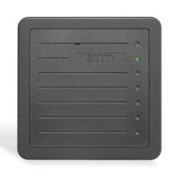
The
ProxPro proximity card reader¡¯s
weatherproof design
and architecturally attractive enclosure allows easy
mounting indoors or out. The ProxPro Reader
is ideal
for applications requiring a larger read range.
Key Features
•
Affords high reliability, consistent read range characteristics,
and low power consumption in a single,
easy-to-install package. •
Features multicolor LED, internal or host control of the LED, and/or beeper and a beeper ¡°off¡± switch for silent
operation. •
Provides Wiegand protocol interface
compatibility with
all standard access control systems. •
Offers an optional, fully integrated personal identification
number keypad for heightened security. Can
be mounted to glass (using the optional glass mounting
kit).
For
a longer read range, try the new generation ProxPro®
II Reader, which
provides an additional inch (2.5 cm) of read range, requires
just 5 volts for operation, and is lower-priced than the ProxPro
Reader!
Specifications
• Dimensions:
5.0"
x 5.0" x 1.0" (12.7 x 12.7 x 2.54 cm) • Material:
Polycarbonate
UL 94 • Power
supply: 10-28.5
VDC; Linear power suppliesrecommended.
Reverse voltage protection included. • Current
requirements: Average:
100 mA (12 VDC) Peak:
120 mA (24 VDC) • Operating
temperature: -22°
to 150° F (-30° to 65° C) • Operating
humidity: 0-95%
relative humidity noncondensing • Weight:
12
oz. (336 gm) • Transmit
frequency: 125
kHz • Excite
frequency: 125
kHz • Cable
distance: • Wiegand
or Clock and Data interface: 500 feet (152 m) • RS-232
interface: 50 feet (15 m) • RS-422
interface: 4000 feet (1219 m)
|
| |
Features
• Mounting:
mounting
holes fit standardU.S.A. single-gang switch
boxes (vertically mounted) to simplify installation. Field
adjustable for mounting directly
to metal, exhibiting only minimal effects on read range. A
selectable jumper
setting provides for improved performance. • Audiovisual
indication: when
a proximity card is presented to the reader, the
red LED flashes green and the beeper sounds. The multicolor LED
and beeper
can also be controlled individually by the host system. • Diagnostics:
on
reader power-up, an internal self-test routine checks and verifies
the setup configuration, determines the internal or external
control of
the LED and beeper, and initializes the reader¡¯s operation. An
additional external
loop-back test allows the reader outputs and inputs to be
verified without
the use of additional test equipment. • Indoor/outdoor
design: sealed
in a rugged, weatherized polycarbonate enclosure
designed to withstand harsh environments, providing
reliable performance
and a high degree of vandal resistance. Easily installed in
any location,
even with the optional keypad. • Easily
interfaced: interfaces
with all existing Wiegand protocol
access control
systems. Output data in Wiegand or Clock and Data
format, plus optional
RS232 and RS422 serial interfaces. • Security:
includes
a tamper switch to provide notification of reader tampering.
Recognizes card formats up to 85 bits, with over 137
billion unique
codes. • Keypad
option: available
with an optional, integrated weatherized keypad, which
provides an additional level of security by allowing the use of
a personal
identification number (PIN). The keypad interfaces with the
host system
either by sending the keypad data over the data output lines, or via
a direct
connection to the host keypad interface. • Warranty:
warranted
against defects in materials and workmanship for life from
date of shipment. (See complete warranty policy for
details.)
Card Read Range
• ProxCard
II - up to 8¡± (20 cm) • IsoProx ¥± - up to 7" (17.5 cm) • DuoProx ¥± - up to 7" (17.5 cm) • Smart IsoProx ¥± - up to 7¡± (17.5
cm) • Smart DuoProx ¥± – up to 7¡± (17.5
cm) • HID
Proximity & MIFARE – up to 7¡± (17.5 cm) • ProxCard Plus - up to 3" (7.5 cm) • ProxKey
¥± - up to 3" (7.5 cm) • MicroProx
Tag – up to 4¡± (10.2 cm) • ProxPass
Active Vehicle Tag – N/A
Ordering Information
• Model Number: • 5355: Wiegand ouput (standard) • 5352: Serial output • 5358: Clock & Data output • Colour Option: Charcoal gray (standard), Beige
Download
• Catalog • How to Order Guide

|